Swifto
Features Solutions Pricing Testimonials Press & media FAQ About Data privacy Contact Blog
Log in Demo account
FR EN ع
Cash register & Point of sale management

POS and cash register software in Tunisia: sell fast, close right

Swifto's POS register is integrated into your ERP: opening and closing sessions, multi-method payment collection, receipts. Every sale updates inventory and cash flow in real time — at the counter and on a tablet.
500+ companies trust us | Tablet register included
Swifto POS on a landscape tablet: sales screen and cart
Sale collected
Inventory & register updated
Tablet or touchscreen
in landscape mode
In brief

What is the Cash Register & Point of Sale module of Swifto ERP?

The Cash Register module of Swifto ERP is a point-of-sale software connected to the ERP: opening and closing of sessions with counting, payments in cash, card or cheque, receipts and returns. Every sale reduces stock and feeds cash in real time, with no file transfer and no double entry at the end of the day.

The Swifto register at the counter of every business
CommerceRetailRestaurants BakeryGroceryShop
The benefit

A register that talks to your whole business

Too many businesses run the register on one side and the ERP on the other: wrong stock at night, cash discrepancies, re-entered payments. With Swifto, the POS register is a module of the ERP — every sale is instantly reflected in inventory and cash flow.

Multi-method payment collection

Cash, cheque, bank card or draft: each payment collection type is configurable and consolidated. The cashier picks the method, Swifto records everything.

Consistent register & stock

Every sale generates a stock movement in real time. No more wrong stock counts at closing: what leaves the register leaves the stock, automatically.

Reliable closings

Opening, the day's sales, closing with cash float control: you close every session on accurate figures, point of sale by point of sale.

In pictures

Swifto POS in pictures

Real screenshots of the Swifto POS register app, on a tablet.
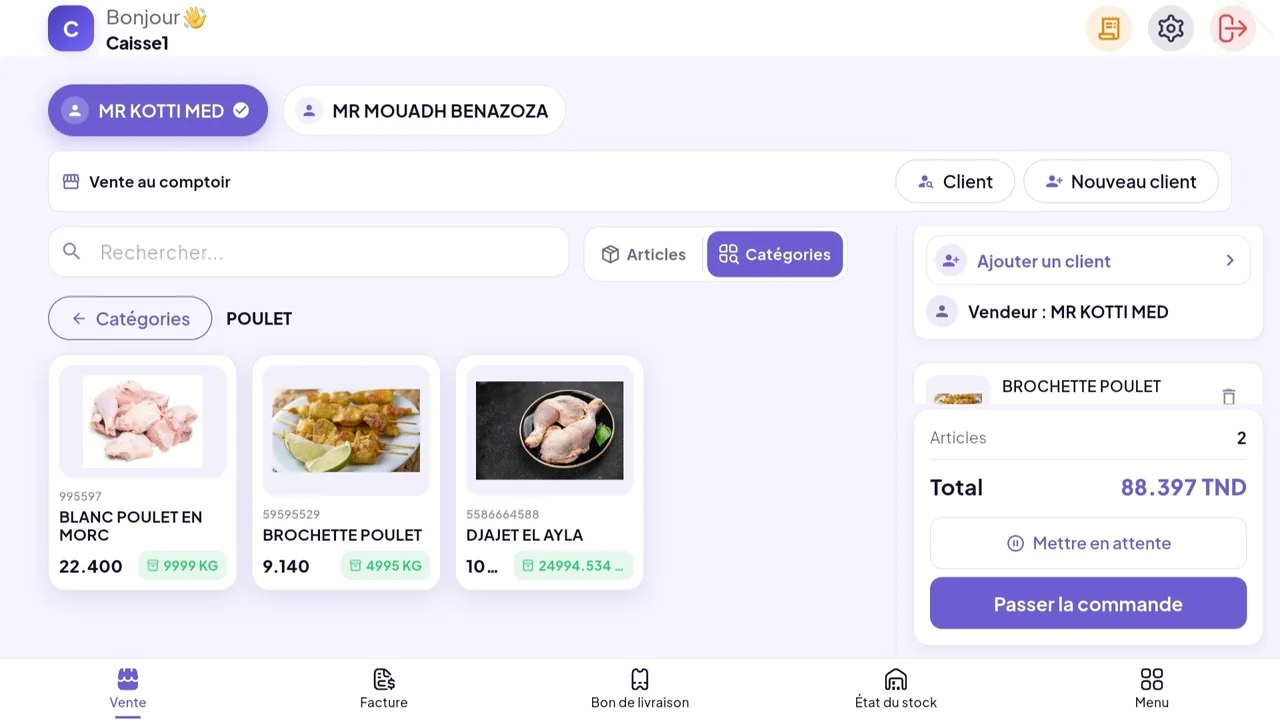
Swifto POS sales screen with the cart
Sale and cart: seller selection, items by category, total and “Place the order”.
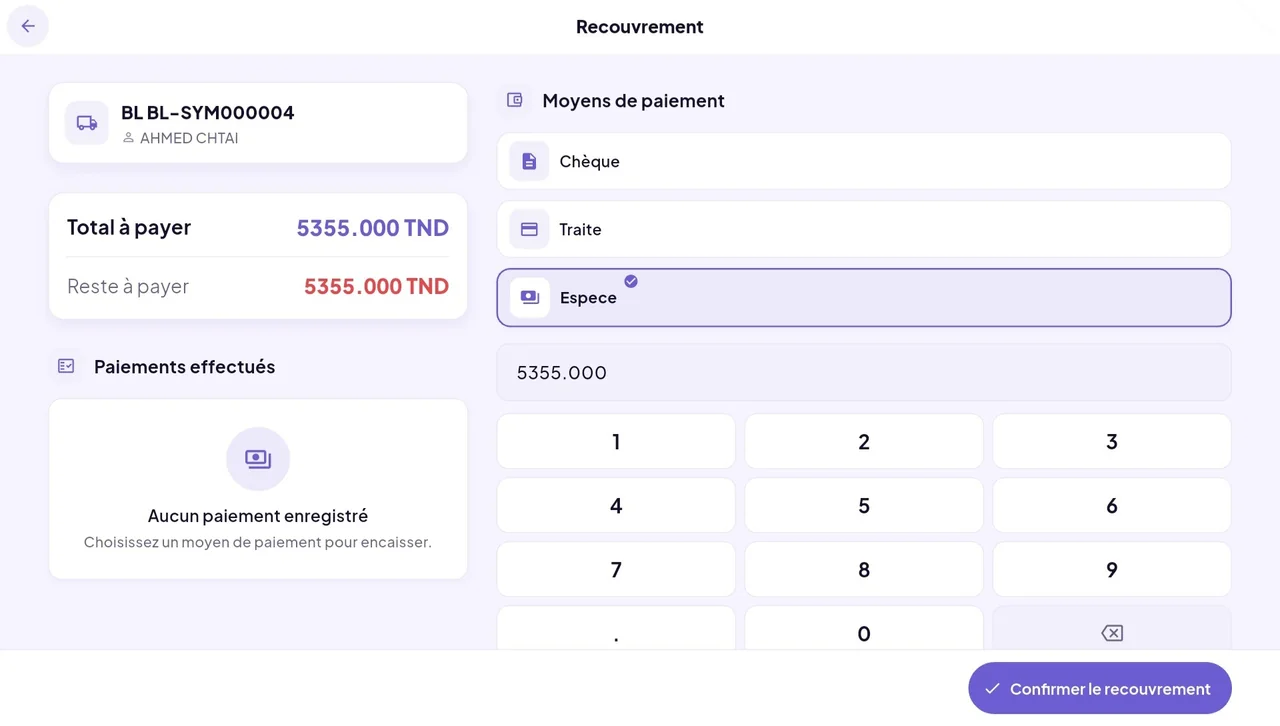
Swifto POS collection screen
Collection and payment: cheque, draft or cash, remaining balance and numeric keypad.
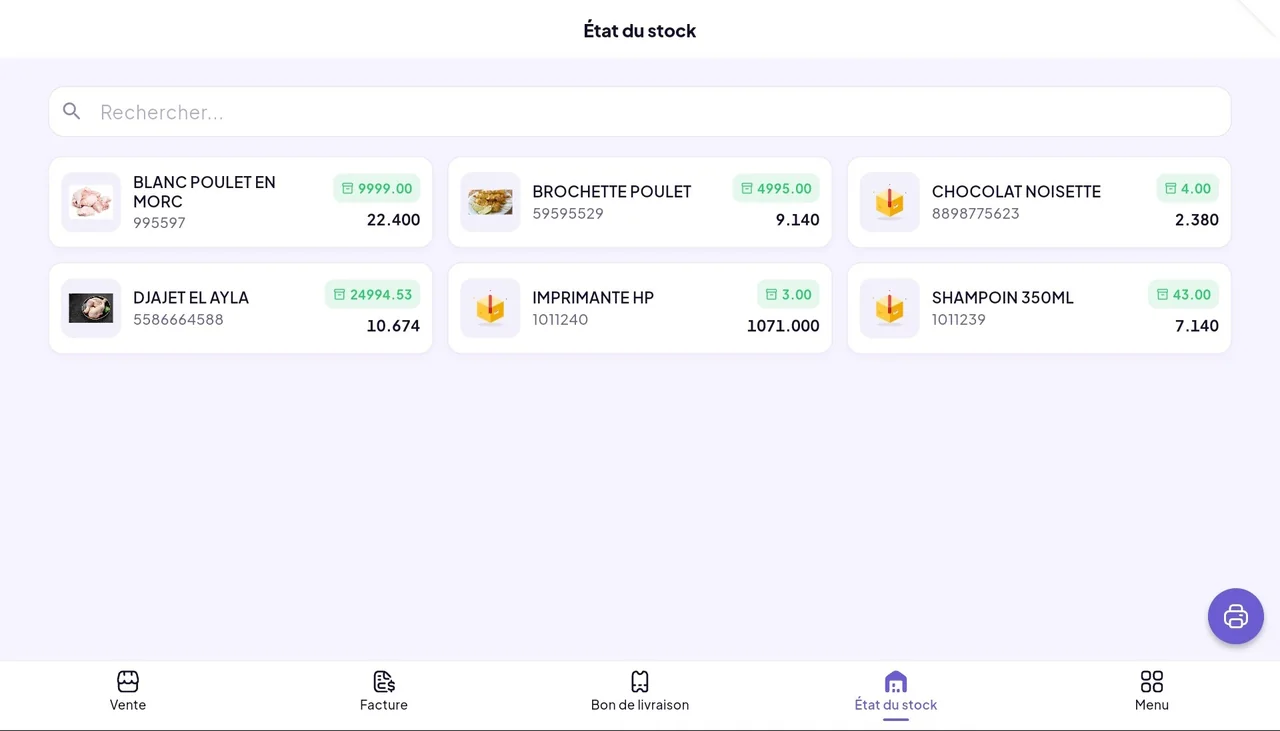
Stock status in Swifto POS
Stock status: available quantity and price of each item in the register.
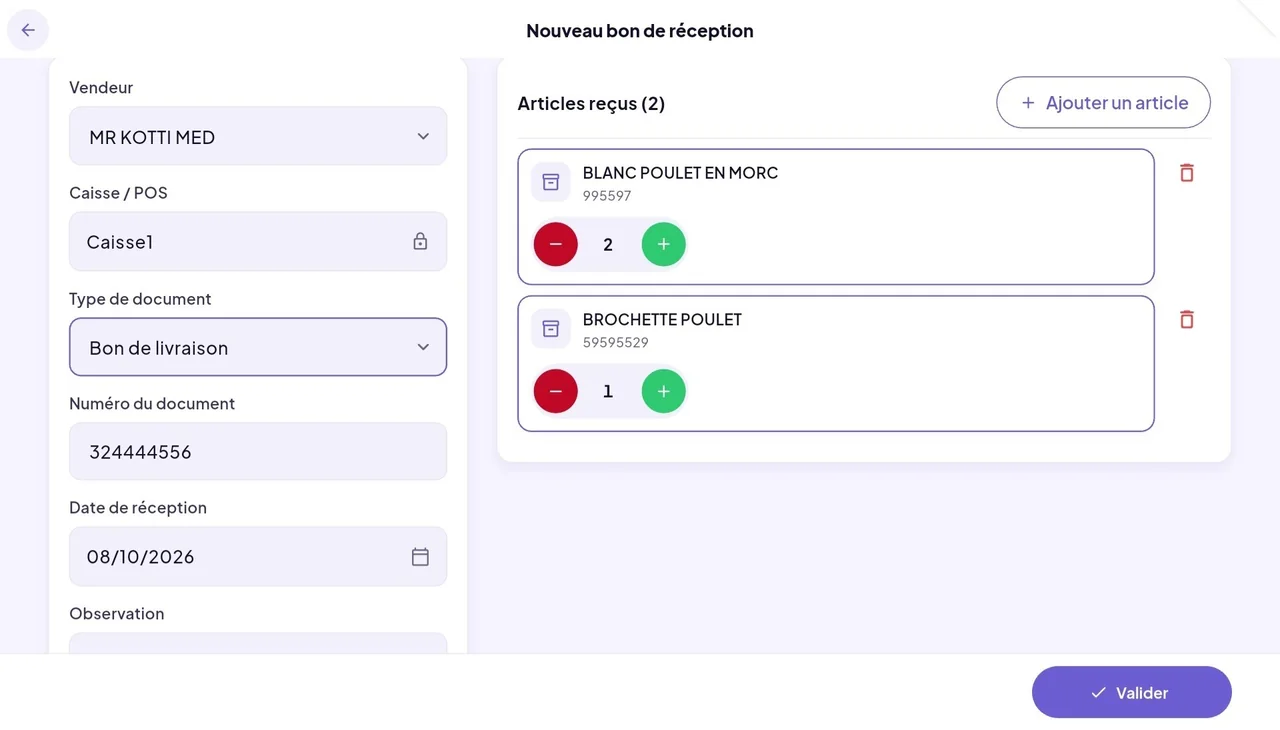
New goods receipt in Swifto POS
Goods receipt: source document, date and items received.
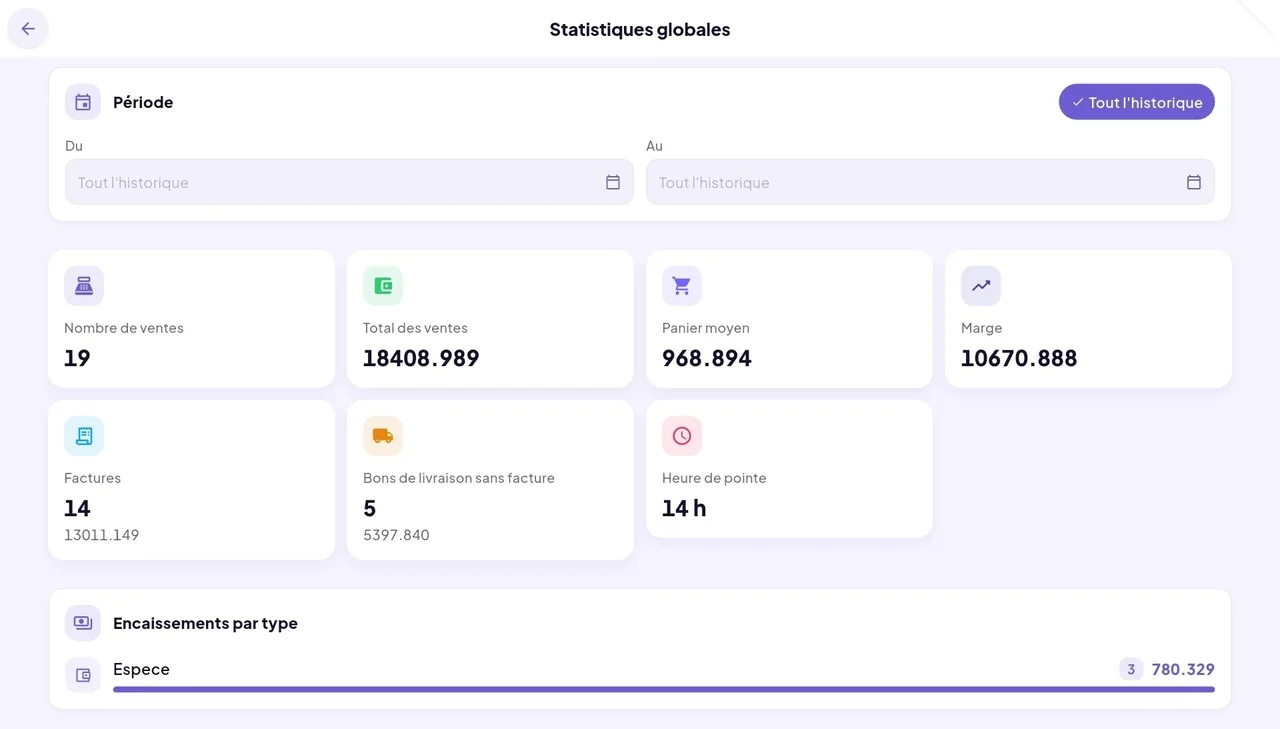
Global statistics in Swifto POS
Statistics: number of sales, total, average basket, margin and payments by type.
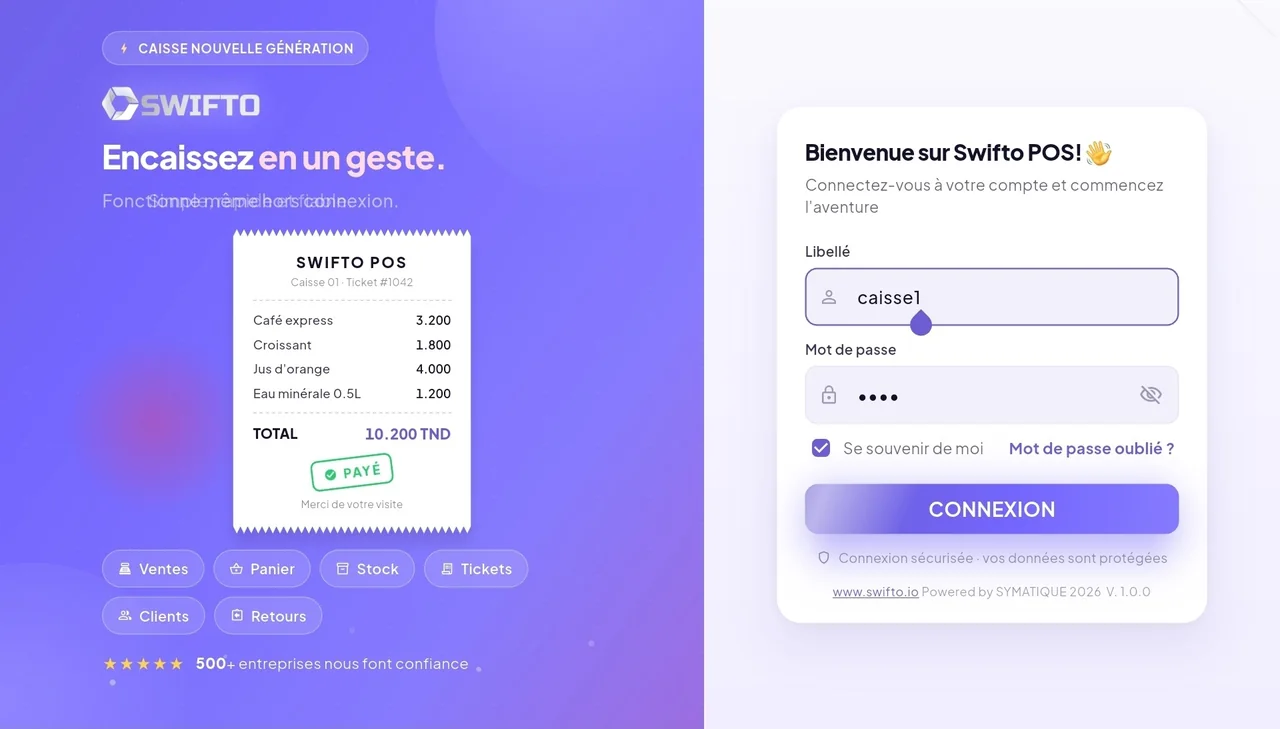
Swifto POS login screen
Sign-in: each register logs in with its label and password.
app.swifto.io/pos/encaissement
Payment collection
Register 1 · Counter
Coffee 1kg · ×354 TND
Sugar 5kg · ×238,500 TND
Total to pay128,500 TND
Cash
Card
Cheque
Draft
Payment collection

Collect in a few taps

Select items, choose the payment method, print the receipt: payment collection gets straight to the point. The cashier signs in with the register label and its password and keeps the queue moving.

  • Payment methods cash, cheque, card and draft, each configurable to your business.
  • Receipts printable, handed to the customer at every sale.
  • Discounts & return notes at the point of sale, with the credit note handled directly at the register.
See payment collection in a demo
app.swifto.io/pos/session
Cash register session
Open
Opening · cash float200 TND
Cash payments1 840 TND
Card payments920 TND
Close the register · float control
Cash register sessions

Cash register sessions & closing

Each day opens with a cash float and ends with a closing. Swifto summarizes payment collections by method and checks the cash discrepancy, for accounts that add up.

  • Opening & closing of a session by cashier, with a declared cash float.
  • Cash float control at closing: discrepancies identified immediately.
  • Authentication by label and password: every movement is tied to its cashier.
See Finance & Cash flow
app.swifto.io/pos/flux
One sale, three entries
Sale collected
Receipt #00482 · 128,500 TND
Inventory updated
Sales movement · real time
Cash flow fed
Consolidated payment collection
Everything is connected

Register linked to inventory & cash flow

A single entry at the counter is enough. The sale updates inventory, feeds payment collection and cash flow, and consolidates the results of all your points of sale — without any re-entry.

  • Automatic stock movement on every sale, items decremented in real time.
  • Consolidated payment collections by register and by point of sale, feeding cash flow.
  • Payment terminal & gateway integrable to collect card and online payments.
See the Inventory module
Built for multi-store retail

From the counter to management, the same figures

The cashier collects fast, the point-of-sale manager closes accurately, and finance management consolidates everything in real time. One platform, zero manual reconciliation.

Point-of-sale manager

Register & sessions

  • Opening and closing cash register sessions
  • Cash float and discrepancy control
  • Return notes and credit notes at the counter
Cashier

Fast payment collection

  • Sign-in with label and password
  • Multi-method collection in a few taps
  • Receipt printed instantly
Finance management

Consolidation

  • Consolidated multi-store payment collections
  • Cash flow fed in real time
  • Inventory and register always consistent
Real time
inventory & register updated on every sale
Multi-register
points of sale consolidated at headquarters
0
double entry between register and ERP
Frequently asked questions

The Swifto register in a few answers

Yes. Every sale collected at the register generates a sales stock movement in real time and feeds cash flow through the payment collection, with no double entry. Inventory and register always stay consistent.
The Swifto register handles payment collection in cash, by cheque, by bank card and by draft or bill of exchange. Each payment collection type is configurable, and a payment terminal or an online payment gateway can be integrated.
The cashier opens a cash register session, records the day's sales and payment collections, then closes the session. Closing lets you check the cash float and consolidate the day's payment collections by payment method.
Yes. Swifto is multi-register and multi-point of sale: each register corresponds to a cash-register-type stock, with an optional main register. Payment collections from every point of sale are consolidated at headquarters in real time.
Yes. At each session closing, the register sends a cash register report (Z report) to the back office: cash float, total sales by payment method (cash, card, cheque), cash movements and cash discrepancy. You review closings by period, by register and by cashier, with no re-entry.
The Z report highlights the gap between the theoretical float and the counted float, and the point-of-sale audit log traces every sensitive action — opening and closing a session, cancelling a receipt, granting a discount, logging in — with its author and timestamp. You can thus quickly identify the source of a discrepancy or tampering.
Beyond the selling screen, look at what the till produces: up-to-date stock, accurate cash and a verifiable session close. A standalone till forces you to re-enter sales in your management system, with a one-day lag. Also check returns, mixed payments and how it runs on a tablet.
Swifto charges 10 TND excl. tax per month and per till, on top of the company plan starting at 59.9 TND excl. tax per month. A shop with two tills therefore pays 20 TND excl. tax per month for its point of sale, with no commission on turnover and no fee per receipt issued.
Yes. The Swifto POS app keeps taking payments offline and stores receipts on the device; they reach head office as soon as the connection returns, together with the matching stock and cash movements. An internet outage therefore does not interrupt counter sales.
app.swifto.io/pos/rapport-z
Z report · closing
Register 1 · 18:30
Cash float (opening)200 TND
Cash sales1 840 TND
Card sales920 TND
Cheque sales310 TND
Cash discrepancy− 4,500 TND
Session closed · Z report sent to headquarters
Control & anti-fraud

Where did the cash discrepancy go? Who cancelled that receipt?

Every closing sends a Z report to the back office and every sensitive action is traced. Detect discrepancies and tampering, make counting reliable and close your registers with confidence.

  • Cash register reports (Z report) at every closing: cash float, sales by payment method, cash movements and cash discrepancy — by period, register and cashier.
  • Point-of-sale audit log: opening and closing, receipt cancellation, discount granted, login — each action with its author and timestamp.
  • Denominations (notes & coins): the reference list of denominations per currency makes counting the cash float and giving change reliable.

Z report

Cash float, sales by payment method, cash movements and discrepancy: every session closes on a consolidated report, sent to headquarters.

POS audit

Openings, closings, receipt cancellations, discounts and logins are traced with the author and time — a real internal-control tool.

Denominations

The reference list of notes and coins per currency (Tunisian dinar) makes counting the cash float and giving change reliable.

Comparisons

Comparing several solutions?

Comparisons built from the publishers' public pages, checked on 7 September 2026: pricing, functional scope, sources cited.

Tunisian ERP comparison

The publishers on the Tunisian market, scope by scope.

Compare

Swifto vs Hesabi

Accounting, payroll, TTN e-invoicing and point of sale.

Compare

Swifto vs SMOFT

Public pricing, included users and modules covered.

Compare

Make your register the heart of your business

See in a demo how the Swifto POS register collects faster and keeps inventory, cash flow and register perfectly aligned.