Swifto AI manual
Swifto AI is Swifto ERP's intelligent conversational assistant: ask your business questions in natural language — "what's my revenue this month?", "who owes me money?", "which items are out of stock?" — and instantly get your company's real figures, securely: read-only, same permissions as the ERP, data processed on-premise.
* By default: language understanding runs on the company's own servers (see Privacy).
Overview
Swifto AI is your company's private AI chatbot, built into Swifto ERP. Instead of navigating from screen to screen to find a figure, you ask your question as you would a colleague: the assistant understands the request, checks your permissions, queries your company's data and answers within seconds — clear text, indicators, cards and charts. It covers the bulk of lookup needs: sales, customers, purchasing, suppliers, stock, finance, HR, CRM, vehicle fleet, registers and documents.
What Swifto AI does
- Answers business questions in natural language
- Returns the ERP's real figures (no data is invented)
- Analyzes: period comparisons, anomalies, unpaid-invoice aging
- Alerts proactively (due dates, delays, revenue drops)
- Exports results to PDF / Excel, with email sending
What it doesn't do (by design)
- Create, modify, validate or delete data
- Show data from another company or outside your permissions
- Answer general-knowledge questions (it only knows your Swifto data)
- Guess: if something is ambiguous, it asks for clarification
Conversational assistant
A natural conversation thread: questions, answers, follow-ups ("and for March?"), clickable suggestions.
Smart search
Finds a customer, item, supplier or employee even with approximate spelling.
Native security
Strict read-only access, the same profiles and privileges as Swifto ERP, complete isolation between companies.
Where can I use Swifto AI?
Swifto AI is accessible from the internal mobile application (Android / iOS) and, for integrations, via a secure REST API. See also Mobile Applications.
Objectives & benefits
The Swifto AI module pursues a simple goal: cut the time to access management information down to a few seconds, for every profile — executive, field sales rep, warehouse clerk, accountant or HR — with no special training and no compromise on security.
| Objective | In practice |
|---|---|
| Time savings | One question replaces several screen navigations: "revenue this month" answers in one sentence where you used to open the sales dashboard. |
| Field accessibility | Mobile teams (sales reps, field sellers) consult the ERP from their phone, in French, English, Arabic or Tunisian dialect. |
| Productivity | Clickable suggestions, follow-up questions, multi-questions ("today's revenue and the unpaid invoices"), one-tap PDF/Excel exports. |
| Proactive management | Automatic insights (aged unpaid invoices, dormant stock, revenue drop) and a 🔔 alerts screen: the information comes to you. |
| Security & compliance | Read-only, permissions identical to the ERP, isolation per company, on-premise language processing, full traceability. |
An assistant, not a replacement
Swifto AI complements the web back-office and the mobile applications: it consults and analyzes. Every action (creating a quote, validating an invoice…) stays within the corresponding Swifto screens.
Access & getting started
Getting started takes three steps. No additional account is needed: your usual Swifto credentials are enough.
Open the application
Launch the Swifto AI mobile application provided by your company (Android or iOS).
Log in
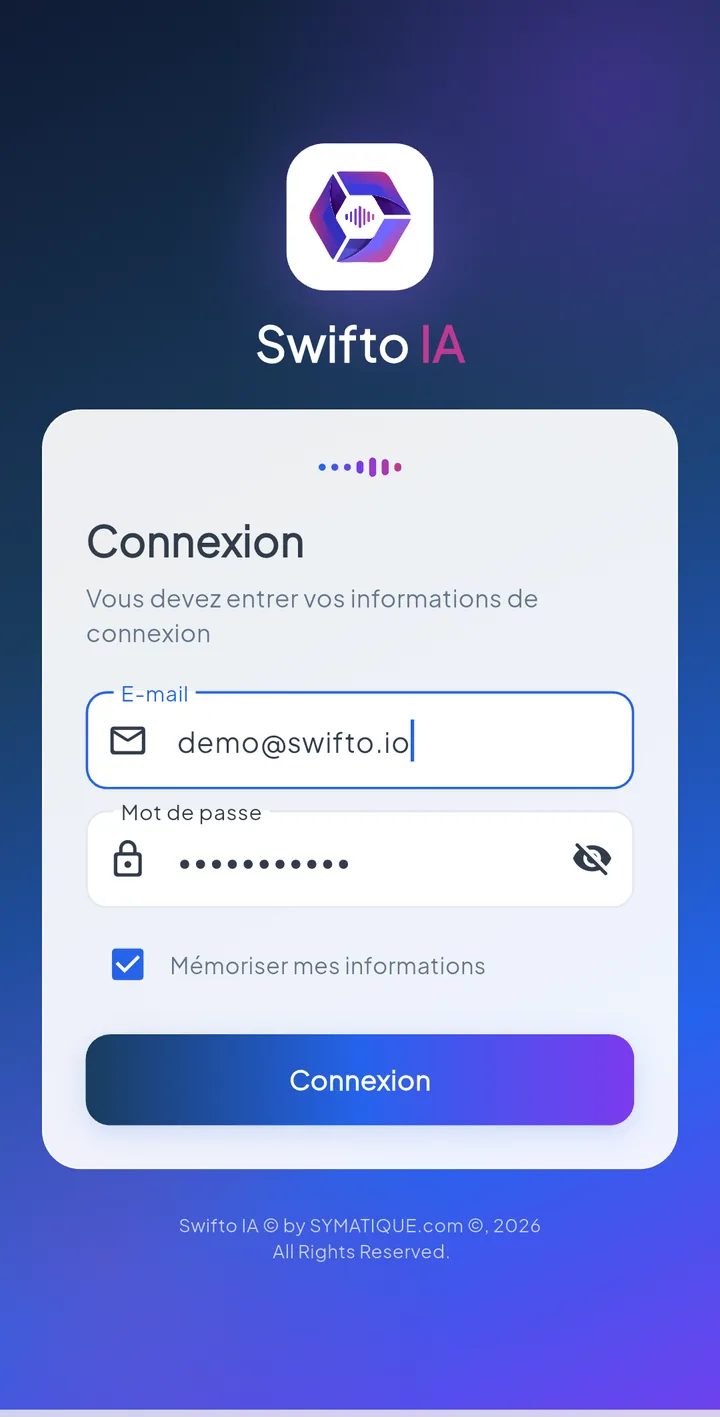
Enter your email (or your mobile number) and your Swifto password. A secure session opens (valid for 12 hours by default); once it expires, the application automatically brings you back to the login screen.
Ask your first question
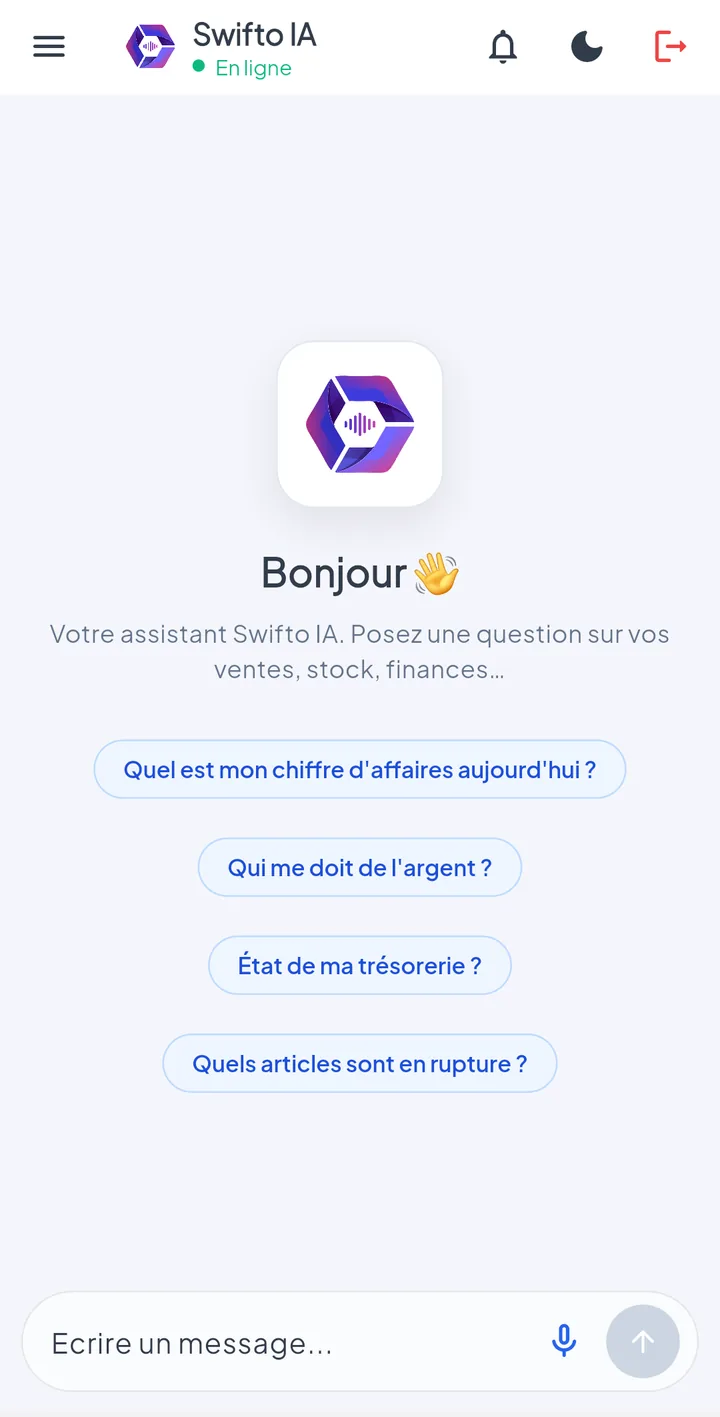
Type (or dictate) your question in the input bar — for example "What's today's revenue?" — or tap one of the starter suggestions shown on screen.
| Screen element | Role |
|---|---|
| Input bar | Area where you type the question; microphone button for voice dictation (depending on the application version) and send button. |
| Conversation thread | Your questions (bubbles on the right) and the assistant's answers (bubbles on the left) with indicators, cards and charts. |
| 🔔 icon (alerts) | Opens the proactive alerts screen, computed for your permissions. |
| Menu / Settings | Light or dark theme, interface language (FR / EN / AR), conversation history, sign out. |
| 👍 / 👎 under the answers | Your feedback on the answer's quality — it feeds continuous improvement (see Management). |
Login blocked? After 5 incorrect passwords, the account is locked for 15 minutes (anti-intrusion protection, identical to the rest of Swifto — see Security).
Asking a question
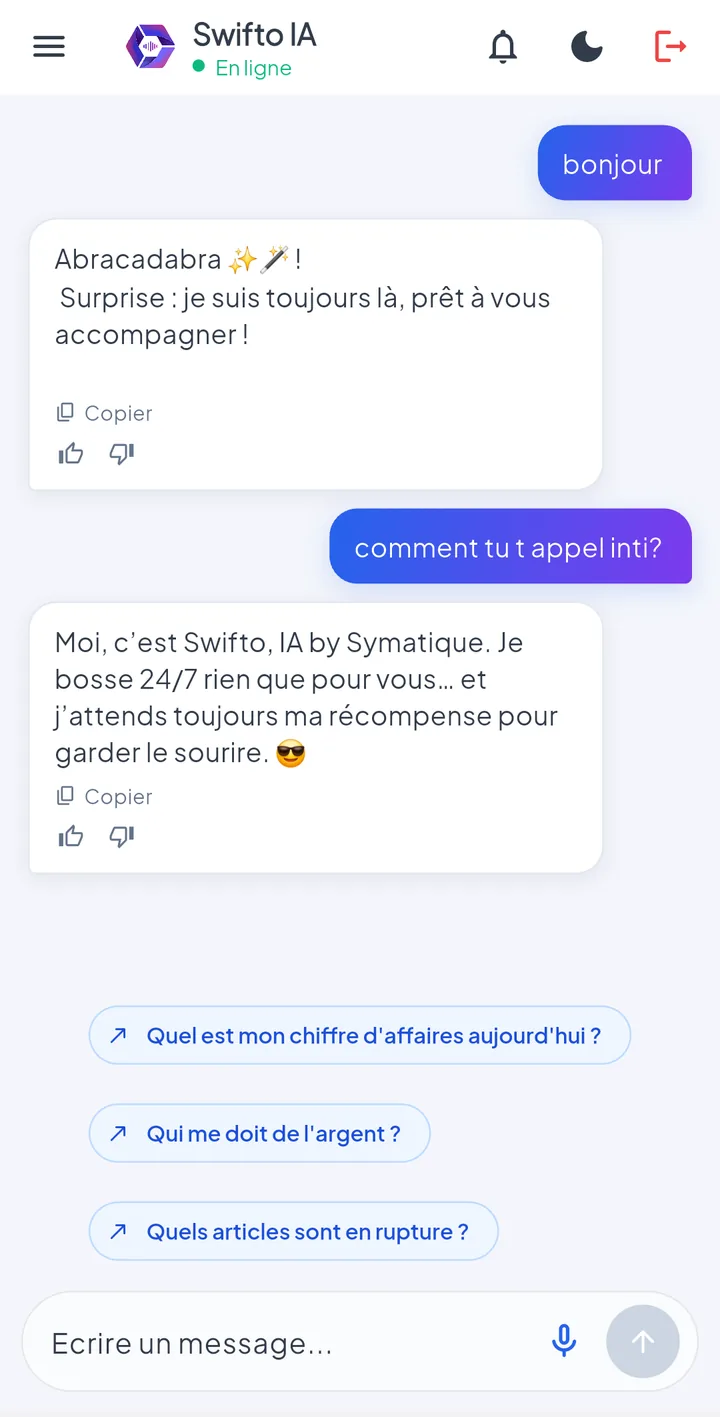
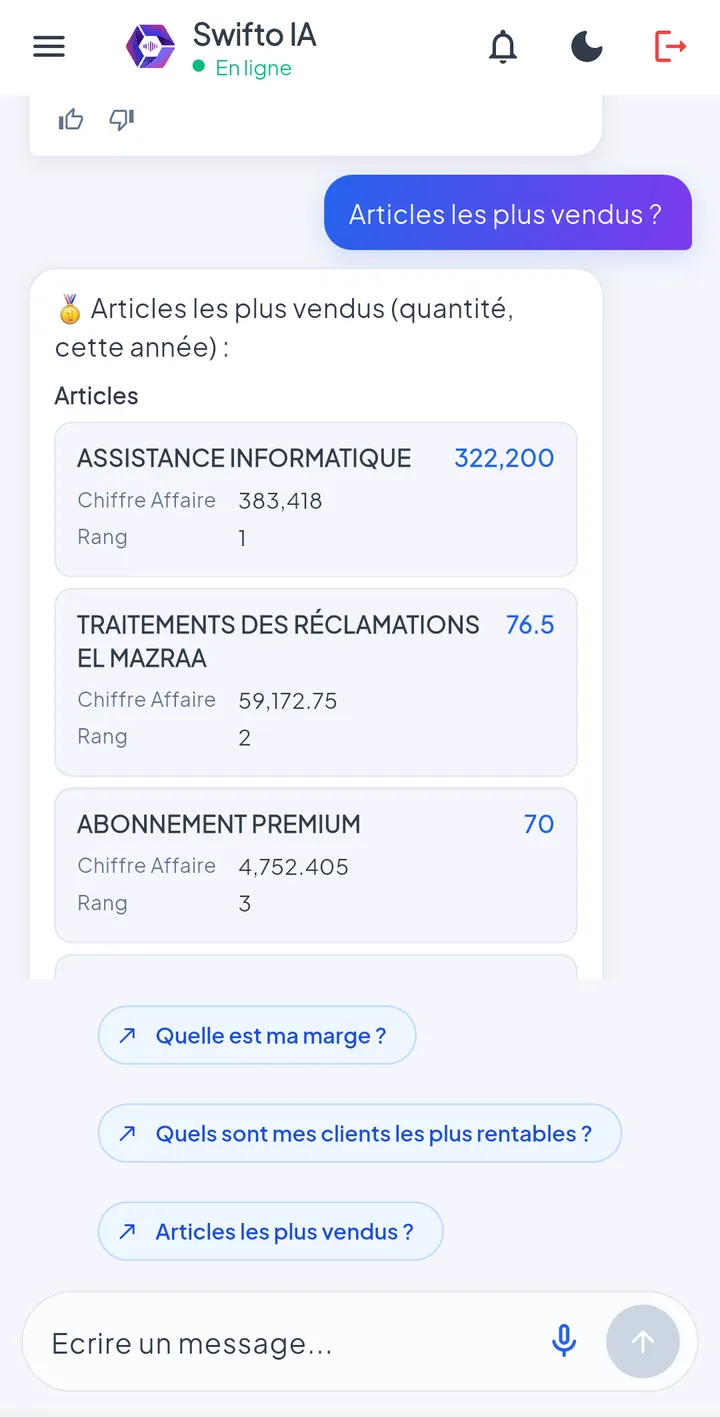
Write the way you speak: no syntax to learn, no code. The assistant recognizes 76 question types and tolerates typos. Here is a typical exchange:
Swifto AI
💰 Unpaid invoices — 12 invoices, 8 customers involved.
9,430.500 TND Of which > 90 days
3,120.000 TND
Each answer combines up to four elements:
Summary text
The answer in one or two sentences, in your language.
Structured data
Indicators (chips), detailed cards, tables — and charts for monthly revenue or unpaid-invoice aging.
Insights
Automatic observation banners, classified info / alert / critical (see §7).
Suggestions
2-3 clickable follow-up questions, tailored to context and your habits.
flowchart LR
  A([Your question]):::s --> B[Language understanding
on-premise]:::p
  B --> C{Read permission
on the module?}:::p
  C -->|yes| D[(Reads YOUR
company's data)]:::ok
  C -->|no| E([Polite refusal]):::ko
  D --> F([Answer + insights
+ suggestions]):::ok
  classDef p fill:#f3f1ff,stroke:#7366fe,color:#1f1c3d;
  classDef s fill:#F1F5F9,stroke:#334155,color:#1E293B;
  classDef ok fill:#D1FAE5,stroke:#10B981,color:#065F46;
  classDef ko fill:#FEE2E2,stroke:#EF4444,color:#991B1B;
No data is invented. The figures come directly from your company's Swifto data, using the same calculation rules as the ERP screens. If the assistant doesn't know, it says so — it never guesses.
Questions by module
The table below summarizes, module by module, example questions and what the assistant answers. Each row assumes your profile has read permission on the module concerned (see §12).
| Module | Example questions | Answer obtained |
|---|---|---|
| Sales | "Revenue today / this week / this month / this year" · "Revenue for January 2025" · "Compare 2024 and 2025 revenue" · "What's my margin?" · "Sales statistics" | Amounts including tax for the period, automatic comparison with the previous period, margin and rate, monthly revenue in a chart. |
| Customers | "Who owes me money?" · "Unpaid invoices for customer X" · "Unpaid invoices over 5,000 dinars" · "My 10 best customers" · "Search for customer Bouzid" | Unpaid invoices (totals, count, aging 0-30 / 31-60 / 61-90 / >90 days), top customers by revenue, customer record. |
| Stock | "How much cement do I have left?" · "Out-of-stock items" · "Items below threshold" · "What is my stock worth?" · "Batches nearing their expiry date" · "Dormant products" | Quantities by warehouse, alert lists, valuation, batches nearing their due date, items with no sale in 90 days along with tied-up value. |
| Finance | "My treasury status" · "Balances of my accounts" · "How much have I collected this month?" · "Upcoming due dates" · "Post-dated cheques" | Combined registers + banks balance, balance per account, receipts / disbursements, supplier due dates, upcoming cheques. |
| Purchasing | "Amount of my purchases this month" · "Unpaid supplier invoices" · "My main suppliers" · "Open supplier orders" · "Record for supplier X" | Purchase totals, supplier debts, supplier ranking, open orders, supplier record. |
| HR | "How many employees do we have?" · "My leave balance" · "Who is on leave?" · "Salary advances" · "This month's payroll costs" · "Record for employee X" | Headcount and list, leave balance of the logged-in account, leave in progress, advances and bonuses, net / gross payroll costs, employee record (hierarchical access, masked IBAN — see §12). |
| CRM | "Phone calls this month" · "Customer complaints" · "Contacts for customer X" · "Sales visits this month" | Calls by period and caller, complaints with status, contact details, visits planned / completed by sales rep. |
| Fleet Management | "Records for my vehicles" · "Costs for vehicle X" · "Fleet costs this year" | Road tax / technical inspection / insurance due dates (flagged if expired / ≤ 30 days), fuel + maintenance + oil-change costs. |
| POS registers | "Statistics for my registers" · "Sales by point of sale" | Revenue and documents per register (sales made at the point of sale). |
| Documents | "List of my unpaid invoices" · "My quotes" · "Partially settled delivery notes" · "Undeclared invoices" · "Settlement notices" · "Customer advances" | Document-by-document lists (number, amount including tax, remaining balance, date) for both sales and purchasing, with a natural-language settlement-status filter: settled / unpaid / partial / all. |
| Sales reps | "Performance of my sales reps" · "Stats for sales rep X" | Revenue, invoices, delivery notes and visits by sales rep. |
Top N understood: "my 5 best customers", "top 10 items" — the requested number is taken into account. Likewise, an amount filter is understood: "unpaid invoices over 5,000 dinars".
Modules not covered: Production (manufacturing orders) cannot be queried by the assistant in this version. POS registers and Fleet Management questions return 0 results if the module is not used by your company. Since Swifto does not manage attendance tracking, attendance / lateness questions do not exist.
Smart search
As soon as a question involves a name — customer, item, supplier, employee — the assistant applies a fuzzy search: accents, capitalization and minor typos are corrected automatically.
Typo tolerance
"unpaid invoices for mazra" finds customer EL MAZRAA; "stock of cimen" finds item Cement.
Clarification
If information is missing ("the unpaid invoices for the customer" — which one?), the assistant asks and then picks up the thread with your answer.
Free-form periods
"January revenue", "last quarter", "between March and June 2025", "the last 6 months": periods are understood in natural language.
No results? The assistant invites you to check the spelling. If the name is very different from the one registered in Swifto, spell it out as it appears in the ERP (see Customer records, Items).
Analysis & insights
Swifto AI does not simply return a figure: it analyzes it and draws your attention to what matters.
Automatic comparison
Every revenue question over a period is compared with the equivalent previous period: variation in %, upward or downward trend.
Anomaly detection
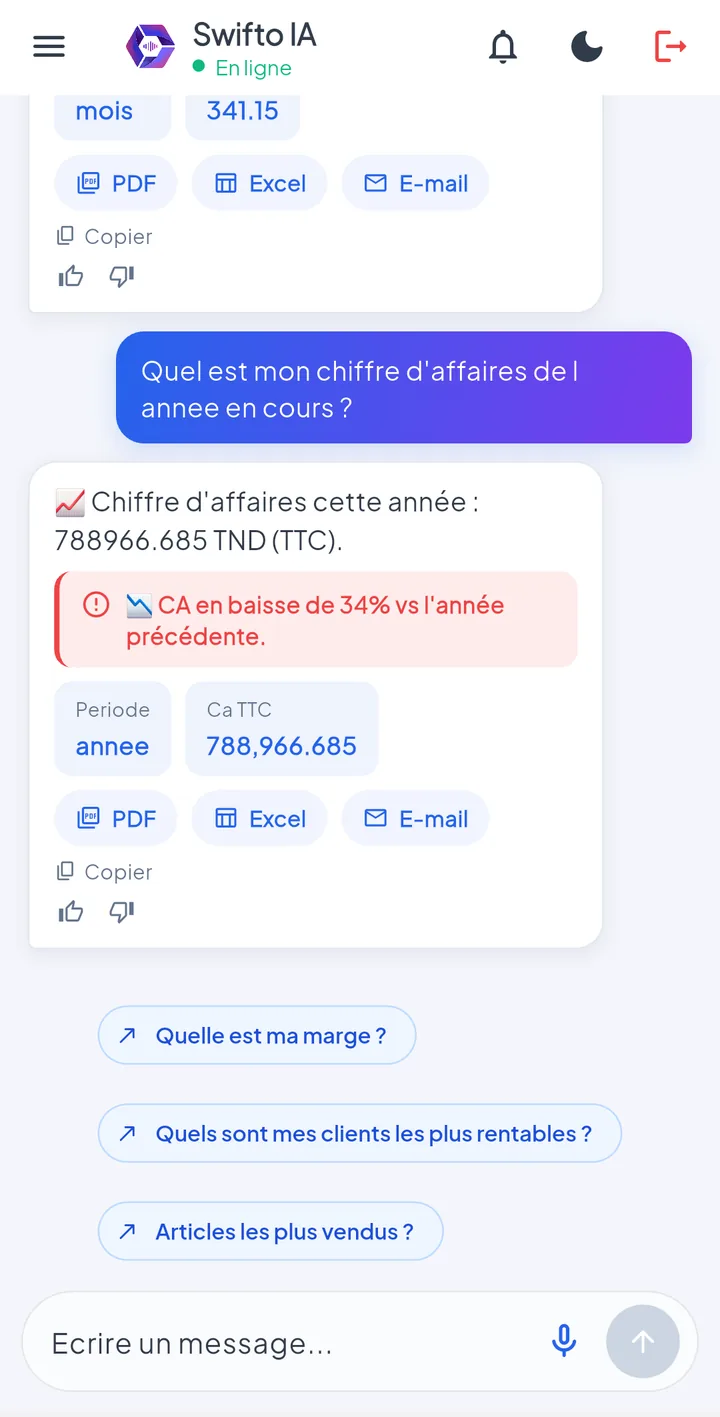
A revenue variation greater than 20 % (configurable threshold) is flagged as an anomaly — for example "📉 Revenue -35 % vs previous period".
Unpaid-invoice aging
Unpaid invoices are broken down by age band 0-30 / 31-60 / 61-90 / >90 days; receivables older than 90 days trigger a critical banner.
Charts
Monthly revenue and unpaid-invoice aging are rendered as charts directly in the conversation.
Insights are banners generated automatically with the answer, classified by severity:
infoNeutral observation — e.g. "Revenue this month: 45,200 TND, +8 % vs previous month".
alertPoint of caution — e.g. "14 dormant items: 22,700 TND of tied-up stock".
criticalRecommended action — e.g. "3 invoices unpaid for more than 90 days" or "abnormal drop in monthly revenue".
Follow-up & multi-questions
The assistant follows the conversation thread like a human would.
Follow-up questions
After "January revenue?", simply continue with:
Follow-up memory lasts 10 minutes; your permissions are re-checked on every question.
Several questions at once
Combine up to 3 requests in a single message:
The answer is structured into sections, each with its own data.
Personalized suggestions
Under each answer, 2-3 clickable follow-up questions:
They adapt to the subject, your language and your frequent questions.
The entity is remembered too
After "the unpaid invoices for customer EL MAZRAA", you can ask "and their contacts?": the assistant reuses the last customer, item or supplier mentioned.
Languages & voice dictation
Swifto AI understands five input languages — write in whichever comes naturally to you, and the answer arrives in your language:
| Language | Example of an understood question |
|---|---|
| French | "Quel est le chiffre d'affaires du mois ?" |
| English | "Show me my best customers" |
| Classical Arabic | "ما هو رقم المعاملات لهذا الشهر؟" |
| Tunisian Arabic | "قداش عملنا اليوم؟" |
| Arabizi | "9addech el CA lyoum ?" · "3andna stock ?" |
Interface language
The mobile application is available in French, English and Arabic; the choice is remembered in Settings.
Voice dictation
Depending on the application version, a microphone button lets you dictate the question (on-device recognition, microphone permission required). Dictation of spoken Tunisian dialect is less reliable than for French or English.
Arabizi is a real asset in the field: teams who write Arabic in Latin letters with digits (9, 3, 7…) are understood ~90 % of the time — with no special configuration.
PDF / Excel exports
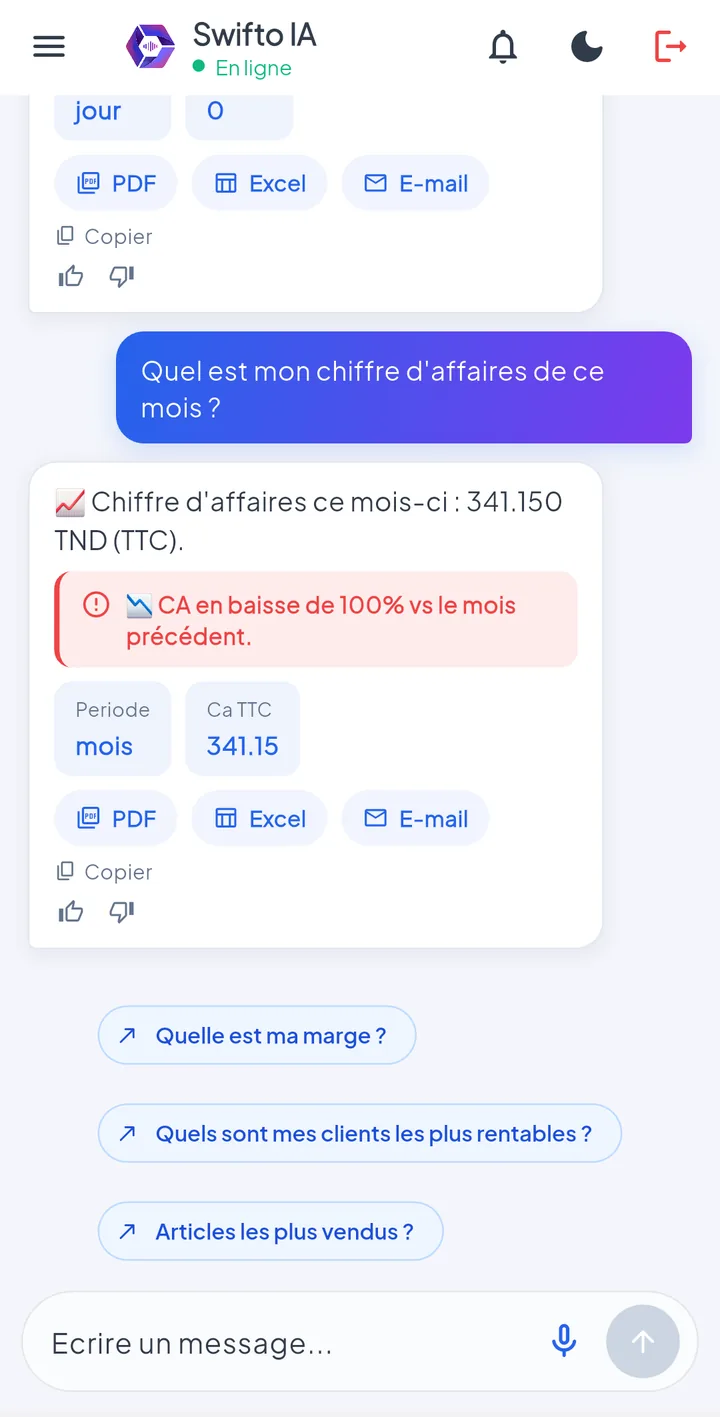
Every figures-based result can be exported in one tap from the conversation:
Laid-out document: title, indicators, detail table.
Excel (xlsx)
Data ready to rework: sorting, filters, pivot tables.
Email sending
The document is sent to one or more recipients — if messaging has been enabled by the administrator.
At the time of export, the question is re-executed with your permissions: you cannot export data you are not allowed to view.
Proactive alerts
Without you asking anything, Swifto AI monitors important signals and groups them in the Alerts screen (🔔 icon in the application). Only the sections covered by your permissions appear.
| Alert | Trigger |
|---|---|
| Supplier due dates | Upcoming periodic purchasing due dates. |
| Vehicles | Road tax, technical inspection or insurance expired or due in less than 30 days (configurable threshold). |
| Overdue invoices | Customer invoices unpaid for more than 60 days (configurable threshold). |
| Today's revenue | The day's revenue, for a daily at-a-glance check. |
| Revenue anomaly | Abnormal drop in monthly revenue compared with the previous period (critical alert). |
Scheduled email digest
In addition, the administrator can enable an automatic email summary of alerts (by default at 7 a.m., Monday to Friday, schedule configurable). Disabled by default.
Morning routine: opening the 🔔 screen gives you, in a few seconds, the day's urgent items — due dates, payment delays, anomalies — without asking a single question.
Access permissions
Swifto AI introduces no new permission system: it applies exactly the profiles and privileges defined in Swifto ERP (see Users & permissions). The rule is simple:
For every question, the assistant checks that your profile has Read permission on the module concerned. Without it: polite, neutral refusal — the assistant does not even reveal that the data exists.
flowchart LR
  Q([Question "out-of-stock items?"]):::s --> P{Profile: Read
on the Stock module?}:::p
  P -->|yes| R([List of stockouts]):::ok
  P -->|no| N(["You don't have access
to this information."]):::ko
  classDef p fill:#f3f1ff,stroke:#7366fe,color:#1f1c3d;
  classDef s fill:#F1F5F9,stroke:#334155,color:#1E293B;
  classDef ok fill:#D1FAE5,stroke:#10B981,color:#065F46;
  classDef ko fill:#FEE2E2,stroke:#EF4444,color:#991B1B;
Managed by the ERP administrator
Adjusting what a user can ask the chatbot = adjusting their privilege profile in Swifto. The change applies automatically, with no action needed on the chatbot side.
HR: hierarchical visibility
Sensitive employee records (salary, contract, IBAN) follow the position hierarchy: each person only sees themselves and their subordinates. The IBAN is always masked (last 4 digits only). The leave balance returned is always that of the logged-in account.
| Situation | Swifto AI behavior |
|---|---|
| Read permission present | Full answer with data, insights and suggestions. |
| Read permission missing | Polite, neutral refusal, no detail — the question is logged in the audit trail. |
| Employee record outside your scope | Refusal that does not reveal the person's existence. |
| Data from another company | Inaccessible by design: every request is locked to your company (see §13). |
A refusal is not a malfunction: if the assistant declines a stock, finance or HR question, it is because your profile lacks the corresponding read permission. Reach out to your administrator.
Privacy
The confidentiality of the company's data is Swifto AI's founding principle — it rests on five technical guarantees:
Read-only, two locks
The assistant only performs lookups, and the technical account that accesses the database is itself unable to write (lock at the database level).
On-premise language processing
Understanding of the questions runs on the company's own servers (on-premise NLU engine). No ERP data is sent to an external AI by default.
Isolation per company
Your company's identifier is sealed into the session token: every request is automatically limited to your data (strict multi-tenancy, as throughout Swifto — see Security).
Full traceability
Every lookup is audited: who asked what, for which company, allowed or refused, and how long it took.
History: on your phone only
Your conversations are kept locally on your device. The server does not store the conversation thread — only audit trails and usage metrics.
What about external AI options?
Optional generative-AI features exist (to help understand difficult questions). They are disabled by default and, even when enabled by the administrator, transmit only the question asked — never any ERP data.
Management & learning (administrator)
An administration dashboard (dedicated web page, sign in with a Swifto account) lets you track chatbot usage and improve it continuously.
Usage metrics
Questions by type, permission refusals, questions not understood, response time.
Satisfaction
Satisfaction rate from users' 👍/👎 and a list of answers rated unsatisfactory (with comments).
Questions not understood
"Knowledge gaps" are classified by frequency and by cause: unknown question, data unavailable, permission refused…
The recommended learning loop turns real missed questions into measurable progress:
flowchart LR
  A([Question not understood]):::s --> B[Logged as a
"knowledge gap"]:::p
  B --> C["The administrator picks the right
intent — tagging"]:::p
  C --> D[Export of the
training batch]:::p
  D --> E([Engine
retraining]):::ok
  E --> F([The assistant now
understands the question]):::ok
  classDef p fill:#f3f1ff,stroke:#7366fe,color:#1f1c3d;
  classDef s fill:#F1F5F9,stroke:#334155,color:#1E293B;
  classDef ok fill:#D1FAE5,stroke:#10B981,color:#065F46;
| Option (enabled by the system administrator) | Effect |
|---|---|
| Messaging (SMTP) | Enables sending exports by email and the alert digest. |
| Scheduled alert digest | Automatic summary email of alerts (schedule and recipients configurable). |
| Alert thresholds | Days before vehicle due date (30 by default), unpaid-invoice age (60 days), revenue anomaly threshold (±20 %). |
| External AI (optional) | Generative-AI understanding fallback — disabled by default; never transmits ERP data. |
Best practice: restrict access to the administration dashboard to administrator profiles, and process questions not understood every week — it's the #1 lever for improving comprehension.
Use cases & best practices
Four typical scenarios, from the daily routine to management reporting:
The executive — morning
- Opens the 🔔 screen: due dates, overdue invoices, anomalies.
- "Yesterday's revenue" then "and this month?" — automatic comparison.
- "Who owes me money?" → PDF export sent to the accountant.
The sales rep — on a visit
- Before walking in to see the customer: "unpaid invoices for customer EL MAZRAA".
- "and their contacts?" — the assistant reuses the customer in memory.
- "stock of item X" to promise a reliable lead time.
The stock manager — weekly
- "Out-of-stock items" then "items below threshold".
- "Batches nearing their expiry date" → destocking priorities.
- "Dormant products" → Excel export for arbitration.
HR — end of month
- "This month's payroll costs" (net / gross).
- "Salary advances in progress" and "this month's bonuses".
- "Who is on leave?" to anticipate payroll and schedules.
Best practices
One simple question at a time (or three, but related)
The best answers come from direct questions: "revenue this month", "unpaid invoices over 5,000 dinars". Very long or off-topic messages lead to a request for clarification.
Use the suggestions and follow-ups
The chips under each answer and follow-up questions ("and for March?") are the fastest way to explore a topic.
Vote 👍/👎
Your feedback guides the administrator: answers rated unsatisfactory are reviewed, and questions not understood are learned at the next retraining.
One account = one person
Answers depend on your permissions and the audit trail logs your lookups: never share your account (see Security).
FAQ & Troubleshooting
Frequently asked questions
Can I create or modify an invoice via Swifto AI?
No. The assistant is read-only by design (double lock: software and database). To take action, use the corresponding Swifto screens.
Does my data leave the company?
Not by default: language understanding runs on the company's own servers. External AI options are disabled by default and, even when enabled, never transmit your ERP data — only the question asked.
How many languages are understood?
Five on input: French, English, classical Arabic, Tunisian Arabic and Arabizi. The application interface is in FR / EN / AR.
Can I ask two questions at once?
Yes: "today's revenue and the unpaid invoices" returns two sections. Up to 3 requests per message.
Is my history visible to others?
No: conversations are stored only on your phone. The server keeps only audit trails and usage metrics.
Can the assistant get the figures wrong?
The figures come directly from Swifto data, using the same rules as the ERP. If something is ambiguous, the assistant asks for clarification rather than guessing; if it doesn't understand, it says so.
What are the 👍/👎 for?
They feed the satisfaction rate tracked by the administrator; 👎 accepts a comment to target improvements.
Troubleshooting
| Symptom | Likely cause | Solution |
|---|---|---|
| "You don't have access to this information" | Your profile does not have read permission on the module. | Ask the administrator to adjust your profile in Users & permissions; the change applies immediately. |
| The assistant doesn't understand the question | Unusual phrasing or topic not covered. | Rephrase more simply or tap a suggestion. The question is logged automatically so the administrator can teach it to the assistant. |
| "No results" even though the data exists | Spelling too different from the registered name, or module (POS, Fleet Management) inactive. | Check the name as it appears in the ERP; check that the module is used by your company. |
| Account locked at login | 5 incorrect passwords → 15-minute lockout. | Wait 15 minutes or reset your password (see Security). |
| Sudden sign-out (back to login) | Session expired (12 hours by default). | Log back in — this is normal security behavior. |
| Exports are not sent by email | Messaging not enabled on the server side. | The system administrator must enable messaging (SMTP); in the meantime, download the PDF / Excel file. |
| Voice dictation doesn't start | Microphone permission denied or recognition unavailable on the device. | Allow the microphone in the phone's settings; otherwise, type the question on the keyboard. |
| A colleague's salary / IBAN is not visible | Hierarchical visibility: the person is not within your scope. | Normal behavior — only your own record and those of your subordinates are accessible; the IBAN stays masked. |
Tip — start with the suggestions
New teams get the hang of the assistant within minutes by tapping the starter suggestions, then naturally varying their own phrasing.
